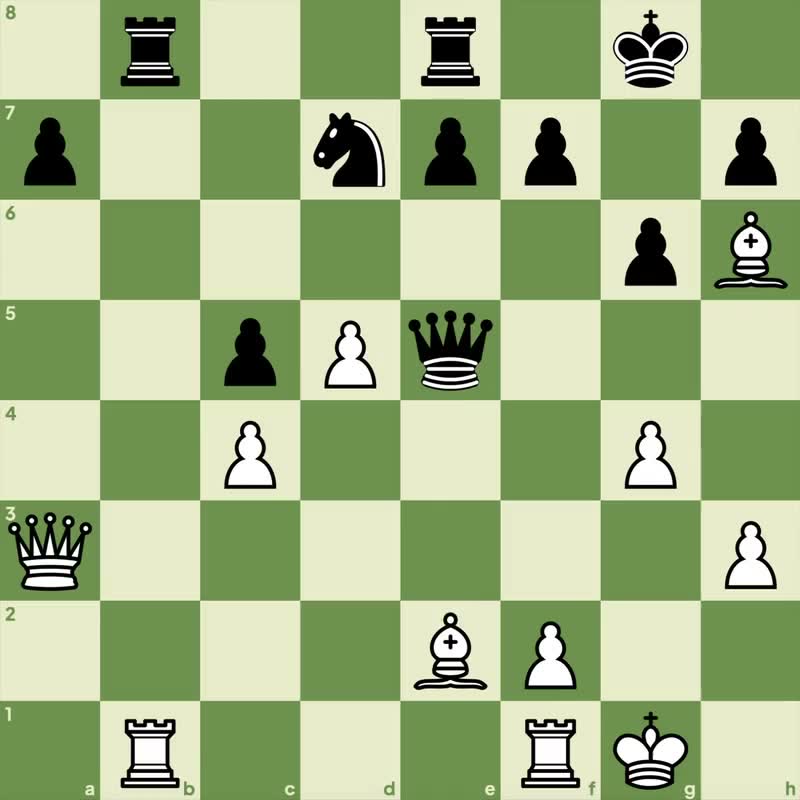
Chess Calculation Training App Without Moving Pieces

A chess calculation training app to solve positions without moving pieces leaves the board as it is while you work out the line, the same way a game does. Of the four apps I look at here, only Peekchess keeps the board still the whole time. Listudy's Blind Tactics show you the board as it was a few moves back, and ChessTempo and Lichess play each reply on the board, so on those two the discipline has to come from you.
I compared them on two questions. Does the board move while you solve, and how do you enter your answer? Everything I say about each app comes from its own pages, checked in October and November 2026. Prices do change, though, so check them before you pay for anything.
Before Peekchess existed, I was already doing this by hand in my lessons. I drew the moves as arrows on a shared screen and left the pieces where they were. With lower-rated players I kept it to a few moves at a time. Stronger players calculated much deeper. Peekchess is that same exercise, built into an app.
Chess calculation training app to solve positions without moving pieces, for visualization, at a glance
| App | Best for | Does the board move while you solve? | How you enter your answer | Free | Paid |
|---|---|---|---|---|---|
| Peekchess | Playing the whole line on a still board | No. The board stays still and the first moves land as arrows | You play every move of the winning line, each checked as you play it, with each move drawn as an arrow | 10 rated puzzles a day, plus unlimited visualization drills and the daily puzzle | Peekchess Pro, $7.99 a month or $59.99 once for life |
| Listudy | Free blind tactics | It shows the board from a few moves back, not the current position | You click your moves on that board, from the position in your head | Everything, free and open source | No paid plan listed |
| ChessTempo | Unlimited rated tactics by theme | Yes. The reply plays on the board after each move | You play one move at a time on the board | Unlimited tactics a day | Gold from $4 a month |
| Lichess | Free puzzles with no limits | Yes. Each reply plays on the board, and a Blindfold switch hides every piece | You play one move at a time on the board | Everything | Nothing to buy |
- Best for playing the whole line on a still board. Peekchess, because the board stays still and every move you play is checked
- Best for free blind tactics. Listudy, because it is free and shows the board from a few moves back
- Best for unlimited rated tactics by theme. ChessTempo, because the free plan has no daily limit
- Best for free puzzles with no limits. Lichess, because everything is free and there is a Blindfold switch
Chess app calculation visualization without moving pieces, how to choose where the board stays still
When you're choosing, three questions sort these apps out quickly.
- Does the board move after your move? If the reply appears on the board, the app is holding the new position for you, and you can get away with solving one move at a time.
- Do you play the whole line or only the first move? Calculation really starts at the second move, so an app that stops after move one is training you to spot an idea, not to see ahead.
- What happens when you're wrong? If you can simply try again, you can guess your way through. In Peekchess, one wrong move ends the puzzle.
The length of the line matters as well, and it matters more the better you get. In our study of 50,000 decisive Lichess games, under 1200, 43 of 100 tactic losses needed 2 moves or more (4 plies). At 2100 and up, 74 did. The full study explains how we counted them.
1. Peekchess, for calculating the whole line on a still board
Peekchess is a chess puzzle app that trains calculation. The board stays still. The puzzle's first moves land as arrows on that still board, so you start from a position you hold in your head. From there you play every move of the winning line yourself. Each move is checked as you play it, each move is drawn as an arrow, and one wrong move ends the puzzle. Full calculation mode takes one position through four steps (tactic, candidate moves, calculation, evaluation). You can calculate just the main line or the whole calculation tree, and every line is checked at the end.
That puts it somewhere between the others. Unlike Lichess and ChessTempo, nothing on the board moves. You don't have to write out side lines, though, because each move is checked as you go and the replies are given to you. The board stays in view the whole time, so it isn't blindfold chess. It runs in the browser, and solving this way is slower than tapping out moves. The free plan is 10 rated puzzles a day, plus unlimited visualization drills and the daily puzzle, and Peekchess Pro is $7.99 a month or $59.99 once for life, with 7 days free on the monthly plan. If you want the detail, see how the method works.
2. Listudy Blind Tactics, free calculation from a board a few moves back
Listudy is free and open source. Its Blind Tactics show you the board as it was a few moves back, with the moves played since then listed beside it, and you choose how many plies stay hidden. While you solve, the board doesn't show the current position. You click your moves on it from the position in your head, and once you've solved the puzzle the final position appears. Its Pieceless Tactics take this further, with only a list of where the pieces stand beside the board.
Of the free options here, it's the best way to practice holding a position. The catch is that you first rebuild the position from a list of moves, which is more blindfold work than a game asks of you. Listudy vs Peekchess goes through the two side by side.
3. ChessTempo, and how to calculate there without moving pieces
My one complaint about ChessTempo is the interface. It looks and feels outdated next to the newer apps, and that can put you off before you get to the good part.
ChessTempo has 350k+ tactics, a tactics rating, a separate rating for each theme and stats by motif, and its free plan gives you unlimited tactics a day. Gold starts at $4 a month and adds spaced repetition. The reply plays on the board after each move, so you can solve one move at a time. I couldn't confirm a visualization mode on its own pages, so on ChessTempo the still board has to come from you.
This is how I'd go about it. Before your first move, say the whole line, with their best reply to each of your moves, all the way to the end. Then play it out without stopping to think. If the reply on the board isn't the one you planned for, count the puzzle as a miss, even if ChessTempo marks it as solved.
4. Lichess puzzles, the Blindfold switch and calculation
Lichess is free and open source with no ads, and every feature is free for everybody. Its puzzles come from Lichess games, are checked by Stockfish, and are rated and tagged by theme. Like ChessTempo, it plays each reply on the board. In puzzles, though, the board menu has a Blindfold switch that makes every piece invisible.
Blindfold is actually harder than a game, because you have to hold every piece and not only the ones that move. For calculation I'd suggest a different habit. Pick the long and very long puzzle themes and say the line before you move. That way the board stays in view, just as it does in a game.
Which calculation app without moving pieces should you pick?
It comes down to what you want from the board, and here is how I'd choose.
- Pick Peekchess if you want to play the whole line on a still board, with each move drawn as an arrow.
- Pick Listudy if you want free practice at holding a position, with Blind Tactics.
- Pick Lichess or ChessTempo if you want unlimited free volume, as long as you say the whole line before your first move.
The puzzle matters as much as the app, though. Chess puzzles where the pieces don't move explains what changes when nothing moves, and how to solve that way on any site. If you're after an app that checks your full line, have a look at the chess app that makes you calculate the whole line.
Questions about calculation apps that don't move the pieces
If you're still choosing where to solve puzzles, here are the best chess puzzle apps in 2026.
Read next. Chess Puzzles Where the Pieces Don't Move, Chess App That Makes You Calculate the Whole Line and Best Chess Calculation Training Apps 2026.
Is there a chess app where the pieces don't move while you calculate?
Yes. In Peekchess the board stays still and the puzzle's first moves land as arrows, and then you play every move of the winning line yourself, each one checked as you play it, with each move drawn as an arrow. Listudy's Blind Tactics work a little differently and show you the board from a few moves back.
Can you train calculation on Lichess or ChessTempo without moving pieces?
Yes, but it comes down to your own habits. Both play each reply on the board, so say the whole line, with your opponent's best reply to each move, before you touch a piece, and count any reply you didn't plan for as a miss. Lichess also has a Blindfold switch that hides every piece, although that's harder than a game.
Is there a free chess calculation app without moving pieces?
Yes. Listudy's Blind Tactics are free and open source, and on Peekchess you get 10 rated puzzles a day for free, plus unlimited visualization drills.
Is solving without moving pieces the same as blindfold chess?
No. Blindfold chess hides every piece. On a still board the starting position stays in view and you only hold the changes in your head, which is exactly what a game asks of you.